Table of contents



Choosing a content management system is one of the most important website decisions a business can make. The platform you choose impacts everything from website performance and security to marketing agility, SEO, maintenance costs, and long-term scalability.
For years, WordPress dominated the CMS market. It became the default recommendation for businesses of all sizes because of its flexibility, large developer ecosystem, and extensive plugin library.
However, as Content Management Systems have become more sophisticated and marketing teams have demanded greater control over their websites, many organizations have started reevaluating whether WordPress remains the best solution for long-term growth.
This has fueled a growing conversation around Webflow vs WordPress. While both platforms can support professional websites, they approach website management, development, and scalability in fundamentally different ways.
In this guide, we’ll compare Webflow and WordPress across the factors that matter most to growing businesses and explore which platform actually scales better in 2026.
The conversation is no longer simply about building a website.
Businesses today need platforms that can support:
As organizations grow, many discover that the platform that worked when they were smaller becomes increasingly difficult to manage.
That’s why the Webflow vs WordPress discussion has become more relevant than ever.
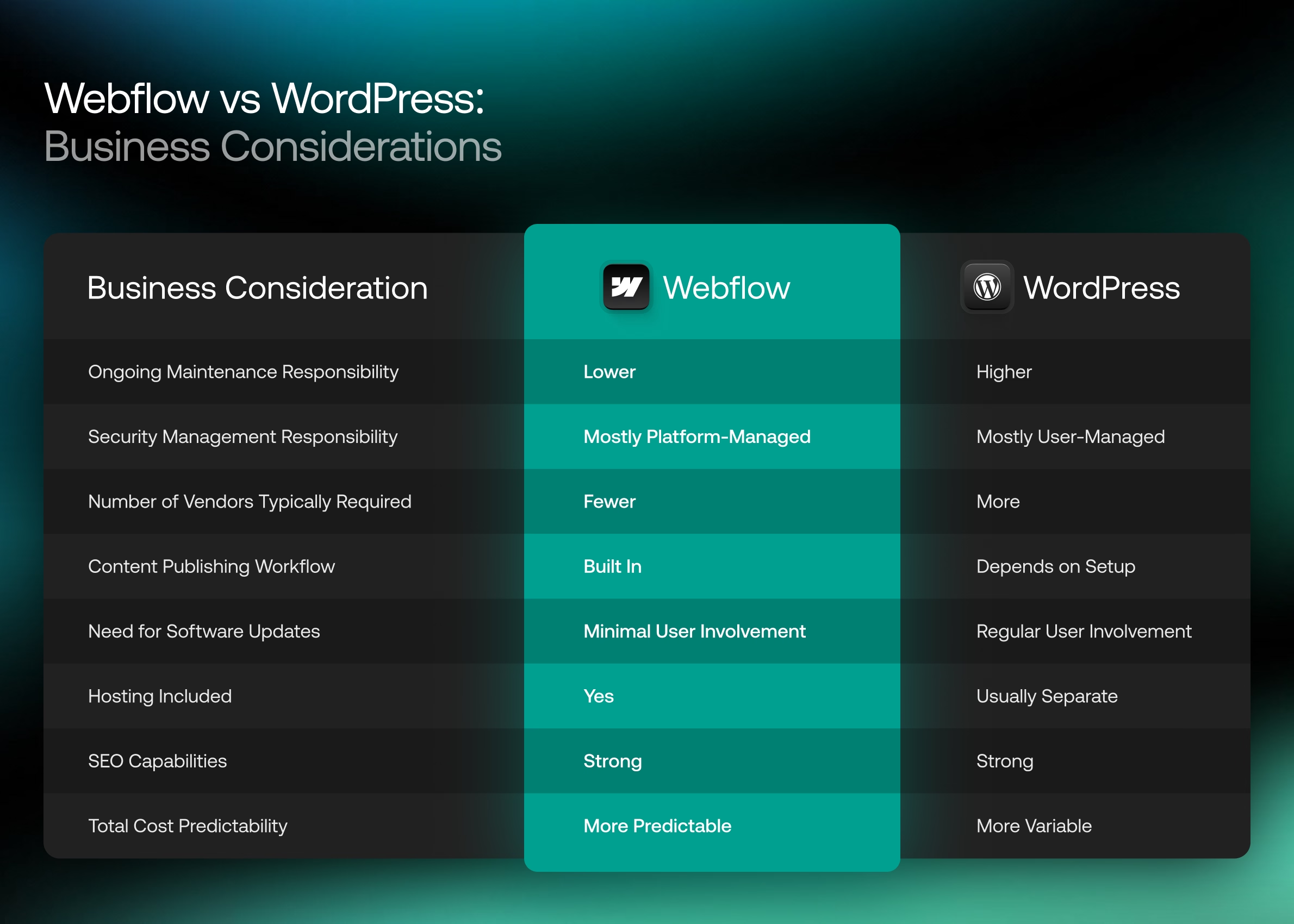
Webflow is a visual website development platform that combines design, development, content management, hosting, and security into a single ecosystem.
Unlike traditional website builders, Webflow generates clean code while giving teams visual control over design and content management.
Key characteristics include:
Webflow is often favored by organizations that want greater marketing agility without sacrificing customization.
WordPress is an open-source content management system that powers a significant portion of the internet.
Its popularity stems from flexibility and an enormous ecosystem of developers, themes, plugins, and integrations.
WordPress can support nearly any type of website, including:
However, WordPress often requires multiple third-party tools and ongoing maintenance to achieve modern functionality.
While both platforms can power professional websites, their philosophies are very different.
Webflow emphasizes simplicity, performance, and integrated functionality.
WordPress emphasizes flexibility through customization and third-party extensions.
These differences influence nearly every aspect of website management.
For marketing teams, content management is often one of the biggest deciding factors.
WordPress provides a familiar editing experience but often becomes more complex as plugins, page builders, and custom functionality accumulate.
Many businesses eventually find themselves dependent on developers to make seemingly simple updates.
Webflow was built with marketers in mind.
Content editors can update CMS content, publish pages, modify content structures, and launch campaigns without relying heavily on developers.
For organizations that publish content frequently, Webflow often creates a more streamlined workflow.
WordPress offers tremendous flexibility because developers can build virtually anything.
However, much of that flexibility comes from custom development, plugins, or page builders.
Webflow provides visual control while still enabling highly customized experiences.
Design teams can create custom layouts, interactions, animations, and responsive experiences without relying on prebuilt themes.
For businesses prioritizing custom design, both platforms can deliver strong results, though Webflow often allows for faster execution.
Website speed directly impacts user experience, SEO, and conversions.
WordPress performance varies significantly depending on:
A poorly maintained WordPress site can become bloated over time.
Webflow’s hosted infrastructure provides a more controlled environment.
Because hosting, performance optimization, and infrastructure are built into the platform, many Webflow websites achieve strong performance with significantly less maintenance.
SEO remains one of the most common concerns when evaluating Webflow vs WordPress.
Both platforms support:
Historically, WordPress gained an SEO reputation due to plugins like Yoast SEO and Rank Math.
Today, Webflow provides most critical SEO functionality natively.
In practice, SEO success depends far more on strategy, content quality, technical implementation, and authority than on the platform itself.
Security is often where the biggest differences emerge.
WordPress websites frequently require:
Every plugin creates another potential vulnerability.
Webflow manages these responsibilities centrally.
Security updates, hosting infrastructure, backups, and platform maintenance are handled automatically.
For many organizations, reducing maintenance overhead is a significant advantage.
Scalability means different things to different businesses.
Some organizations need content scalability.
Others need marketing scalability.
Others require operational scalability.
Webflow often excels in situations where marketing teams need to move quickly without developer bottlenecks.
WordPress can certainly scale, but it typically requires more ongoing technical oversight as complexity increases.
WordPress has one of the largest plugin ecosystems in the world.
This creates enormous flexibility.
It also creates risk.
Plugin conflicts, security vulnerabilities, abandoned software, and performance issues can become challenges over time.
Webflow takes a different approach by offering many core features natively and supporting integrations through APIs and third-party platforms.
For highly specialized functionality, WordPress often has the advantage.
For simplicity and stability, Webflow often wins.
Both platforms provide robust content management capabilities.
WordPress offers virtually unlimited content flexibility through custom post types and plugin extensions.
Webflow provides a highly structured CMS that works particularly well for:
For most marketing websites, Webflow’s CMS capabilities are more than sufficient.
WordPress primarily relies on WooCommerce for e-commerce functionality.
WooCommerce is extremely powerful and highly customizable.
Webflow offers native e-commerce capabilities that work well for many businesses but may be less suitable for highly complex online stores.
Organizations with extensive product catalogs and advanced e-commerce requirements may still prefer WooCommerce.
However, many businesses now choose Shopify for dedicated e-commerce needs regardless of whether their marketing website uses Webflow or WordPress.
When evaluating Webflow SEO vs WordPress, businesses often assume WordPress has an inherent advantage.
In reality, both platforms can perform exceptionally well.
Webflow offers:
WordPress offers:
The platform itself rarely determines rankings.
The quality of SEO strategy, technical implementation, content development, and authority building have a much greater impact.
When evaluating Webflow vs WordPress for B2B marketing, Webflow often aligns more closely with modern marketing team workflows.
Many B2B organizations need to:
Webflow allows marketers to make many of these changes without involving developers.
This can significantly improve agility and reduce operational friction.
For marketing-led organizations, this advantage is often substantial.
Comparing Webflow vs WordPress pricing can be misleading because the costs are structured differently.
WordPress itself is free.
However, businesses must often pay for:
Webflow bundles many of these expenses into a single platform.
While monthly platform costs may appear higher initially, total ownership costs are often more predictable.
For growing businesses, predictability can be more valuable than a lower upfront expense.
Security remains one of the strongest arguments in the Webflow vs WordPress security discussion.
WordPress security depends heavily on:
The more plugins installed, the larger the potential attack surface.
Webflow’s managed infrastructure dramatically reduces these concerns.
Because the platform controls hosting, updates, and infrastructure, businesses spend less time managing security and more time focusing on growth.
Interest in WordPress to Webflow migration has increased significantly as organizations seek simpler website management solutions.
A migration should never be approached as a simple redesign.
Critical considerations include:
When executed properly, businesses can migrate from WordPress to Webflow without losing organic visibility.
In many cases, improved performance, cleaner architecture, and better content workflows create opportunities for long-term growth.
The answer depends on organizational goals.
Webflow.
Marketing teams gain greater control over content, landing pages, and website updates without relying heavily on developers.
Webflow.
While both platforms can perform well, Webflow’s infrastructure and cleaner architecture often make performance optimization easier to maintain.
Both platforms can support enterprise organizations.
The right choice depends on internal resources, governance requirements, and technical complexity.
WordPress.
For highly customized applications, complex functionality, and specialized integrations, WordPress often provides greater flexibility.
Many businesses focus on the wrong criteria when evaluating platforms.
Common mistakes include:
The best CMS is not necessarily the most powerful.
It’s the platform that best supports your organization’s goals, workflows, and growth plans.
A migration may make sense if:
For many growing organizations, migrating to Webflow creates a more streamlined and scalable foundation for future growth.
That doesn’t mean every business should abandon WordPress.
It means businesses should periodically evaluate whether their current platform still supports their objectives.
The Webflow vs WordPress debate isn’t really about which platform is universally better.
It’s about which platform better supports your business goals.
WordPress remains an incredibly powerful and flexible platform. For organizations requiring extensive customization and development flexibility, it continues to be a strong choice.
However, many modern businesses are prioritizing marketing agility, performance, security, and ease of management. In those areas, Webflow has emerged as a compelling alternative.
As websites become increasingly important growth assets, organizations should evaluate not only what a platform can do today, but how effectively it can support future marketing initiatives, content strategies, and operational efficiency.
If you’re evaluating whether your current website platform is supporting your business goals, now may be a good time to assess its performance, identify opportunities for improvement, and determine whether a redesign or migration strategy could better support long-term growth.
For many marketing-driven organizations, Webflow offers advantages in usability, performance, security, and content management. However, businesses with highly specialized development requirements may still benefit from WordPress.
Both platforms can support excellent SEO results. The success of a website’s SEO strategy depends far more on content quality, technical implementation, authority building, and user experience than on the CMS itself.
Generally, yes. Because Webflow manages hosting, updates, and infrastructure centrally, businesses have fewer security responsibilities than they would with a typical WordPress website.
A WordPress to Webflow migration may make sense if your organization struggles with maintenance, security concerns, developer bottlenecks, or inefficient content workflows. The decision should be based on long-term business goals rather than platform trends alone.